• Partners Pricing
  • Partner PortalCustomer Sign in
  • Menu

    Close
    • Google Workspace Backup
    • Microsoft 365 Backup
    • K8s Backup & Management
    • AWS Backup
    • Azure Backup
    • Platform Overview
    • Pricing
    • Partners
    • About Afi
    • Support
    • Blog
    Sign in
  • Platform

    Overview of Afi technology and next-generation architecture

DATA PROTECTION

  • — Google Workspace

  • — Microsoft 365

  • — Kubernetes

  • — Amazon Web Services

  • — Microsoft Azure

From the blog

  • Google Workspace Backup Solutions Review
  • Microsoft Teams Backup: Options & Key Features
  • Can Ransomware Hit Your Microsoft 365 Data?
  • Security & Legal

About Us

Learn more and get in touch with us
  • More Details

  • Leadership Statement
  • Resource Library
  • Agreements

  • Privacy Policy
  • Terms of Service
  • Support ticket

    Submit a new support ticket or check the resolution of an existing ticket

  • Documentation

    Review product documentation in Afi Knowledge Base

Best Google Workspace Backup Solutions

Last updated on Aug 1, 2026
~20 min read•~3,500 words
EN | DE

At a Glance

  • There are over 20 Google Workspace backup solutions, but only a few of them provide high-fidelity backup and recovery of Google Workspace.
  • Google Workspace backup market is small relative to other backup workloads, and large backup vendors make limited or no investments in its support
  • Best Google Workspace Backup options are typically provided by SaaS-focused, including Afi.ai and Spinbackup

Google Workspace provides limited built-in data protection against deletions, overwrites, and ransomware. Gartner1, IDC2 and Forrester3 recommend using third-party Google Workspace backups to protect data.

This overview is based on our internal competitive research (Afi develops a Google Workspace backup service). Feel free to check this Google Cloud Architecture article about Afi Google Workspace Backup, if you'd like to get a short overview of Afi backup features.

 1 

20+ Vendors Offer Google Workspace Backup

There are a lot of Google Workspace backup options. Over 20 companies claim to provide Google Workspace backup.

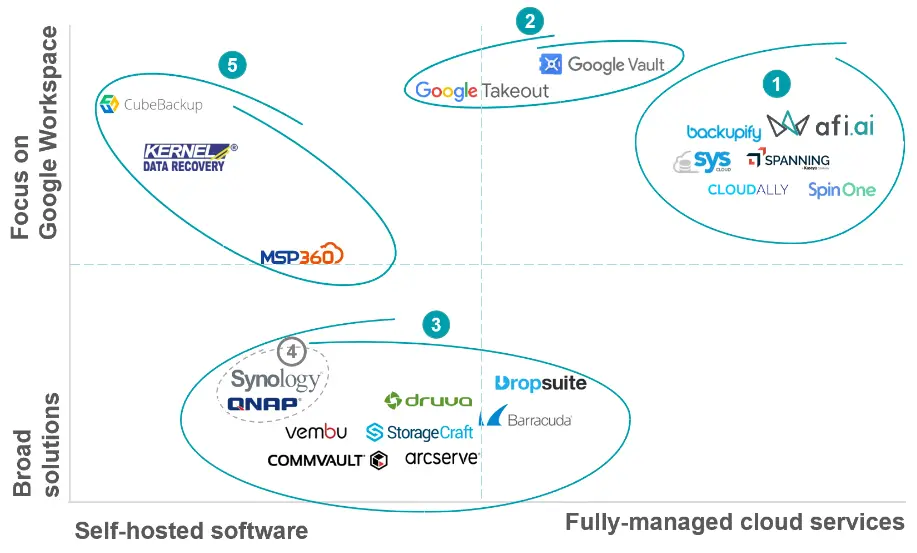
The chart below groups the most notable Google Workspace backup providers into five categories, which we discuss briefly below.

Less than half of the 20+ Google Workspace backup tools focus on Google Workspace as their primary workload

Google Workspace Backup Solutions
  • Cloud-based backup services

These solutions provide fully managed cloud-to-cloud Google Workspace backup services, including vendor-hosted management applications and air-gapped cloud storage.

  • Google recovery tools

There are two native Google tools that help protect user data: Google Vault (archiving & e-discovery add-on) and Google Takeout (built-in tool that allows manual offline data export). Both tools help preserve Google Workspace data and export it offline, but have no recovery capabilities to restore data back to Google Workspace.

  • Broad backup platforms / generalists

These software solutions support Google Workspace as a workload, in addition to the major data sources such as VMware, Hyper-V or databases. Most of their revenue comes from non-Google backup products, and most backup generalists offer limited support of Google Workspace (e.g. not restoring Drive document IDs, no OU structure or sharing permissions recovery).

  • Hardware Appliances

NAS/SAN storage devices that can take regular backups of Google Workspace and store them locally. Synology Active Backup for Google Workspace was released in 2017 and it is essentially an on-premises backup server software preinstalled on Synology NAS devices. .

  • Specialized Local backups for Google Workspace

These tools are focused on Google Workspace and other SaaS apps protection, but don't provide a fully managed cloud service. Customers need to install, maintain and host the software and storage. The price of the software is lower than the price of the cloud backup solutions, but the options become hard to manage if you have more than 100 users.

 2 

Why Vendors Neglect Google Workspace Backup

Only Google-focused providers that generate a meaningful share of their revenue from Google Workspace backup have a strong economic incentive to support Google Workspace data beyond basic email and file backup.

The largest (group 3) vendors, on the other hand, develop broad backup platforms and generally treat Google Workspace backup as table stakes, only implementing the minimal set of features to be able to claim the workload as supported.

We estimate that in 2026 Google Workspace backup accounts for 1.4% share of the overall market, while the largest SaaS workload (M365) accounts for 12.9% of the market. Major backup providers typically allocate very limited R&D resources to support it: the largest backup company, Veeam, has no Google Workspace backup as of August 2026. Other major enterprise backup vendors either provide only basic coverage or no Google Workspace backup at all.

Google Workspace is ~1.4% of the total backup market

Total backup software market, 2026$15.1bn1
Google Workspace · 1.4%
All other workloads — servers, VMs, endpoints, databases · 85.7%
M365 · 12.9%

SaaS seat backup, expanded — $2.16bn across the two suites

Microsoft 365121.5M4 protected seats × $16
$1.94bn12.9% of market
Google Workspace15.6M4 protected seats × $14
$218M1.4% of market

1 Total backup market is based on 6.3% growth applied to IDC’s 2025 market estimate of $14.2bn. 2 Microsoft 365 paid seats (463M): Microsoft 10-Q. 3 Google Workspace paid seats (130M) are based on 13M customers disclosed by Google, multiplied by 10 average number of users per domain (Afi estimates, based on adjusted TechnologyTracker statistics. 4Number of protected seats are estimated using percentage of organizations using backup multiplied by intra-domain protection rate; see M365 backup market sizing for more details; Afi estimates that 20% of organizations backup Google Workspace (compared to 35% for M365); 60% of Workspace users are backed up per organization using a backup solution (75% for M365)

 3 

Best Google Workspace Backup Solutions

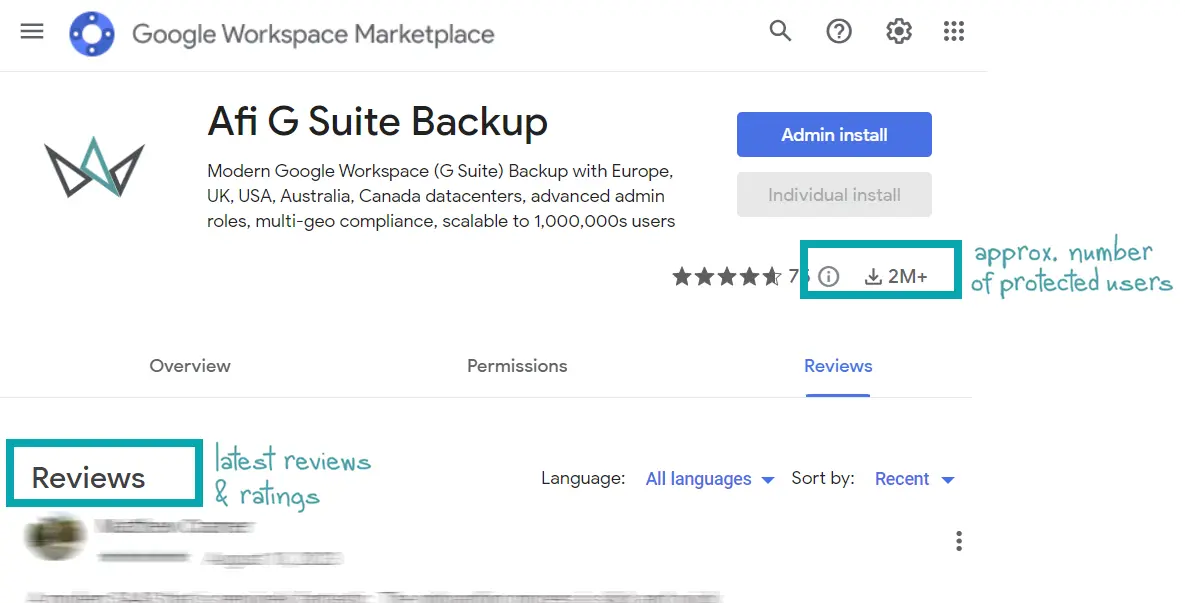
Two useful factors when comparing Google Workspace backup solutions are actual product usage and customer feedback. Luckily, Google Marketplace provides just that information in a way that is both useful and accessible:

  • The number of active users is reported on Google Workspace Marketplace for each backup solution (like any other app). We've used these numbers to analyze the competition for a long time. We've also compared the publicly reported usage number to the actual number of protected/licensed Afi users, and we believe that the reported user base is a very good approximation of the actual number of Google Workspace seats for each backup service – for most vendors (see our note regarding SysCloud)
  • User reviews are posted on each backup vendor's marketplace page, and in our experience they generally provide a fair user feedback on the products. It is hard for a vendor to make customers write artificial favourable reviews – even when users get their backup subscriptions with large discount, they normally write what they really think, not just the good things. And it's even harder to remove a negative review once it's posted.
You can use Google Workspace Marketplace (workspace.google.com) to check vendors' reviews

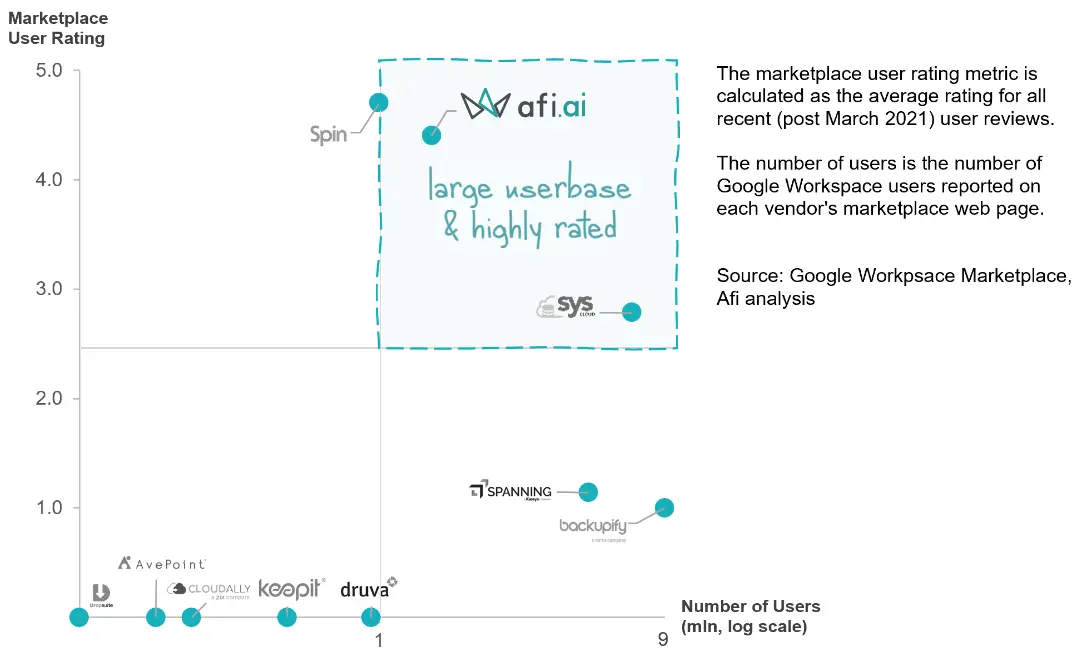
We used the marketplace user feedback and the number of active users stats to create the chart below. Using the two vendor performance indicators, it groups Google Backup providers into four categories, based on the user base size and customer feedback.

Notable backup solutions are:

  • Afi.ai (our product) has the highest number of active users of all the solutions rated above 2.5, the minimal rating we consider adequate. We believe the position reflects our strong focus on the Google Workspace workload;
  • Spin is a security vendor focused on cloud workloads. It has very good user ratings and good performance (see section #5). Its pivot into SaaS security left it with fewer resources to invest in Google Workspace backup, and we don't often see them in enterprise backup deals;
  • SysCloud is another solution with high market share (the marketplace metric may slightly overstate their active usage, as the company is focused the Educational segment where a significant share of Google Workspace users are inactive);
  • Backupify and Spanning have the most users, but have very low user ratings. The two cloud backup companies were acquired by Private Equity firms, merged, and divested multiple times (they currently belong to the same owner, Kaseya). The low user ratings reflect problems related to backup reliability and feature set that customers report over the last 2-3 years (at least in part these problems result from the M&A activity).
Comparison of Google Workspace backup ratings and usage, based on Google Workspace Marketplace
Google Workspace Backup Usage and Ratings

The next section describes our approach to testing backup solutions for Google Workspace, and provides a summary of backup products key benchmarks and features.

us unique: doc IDs, FTS, Roles; syscloud - unsustainable "true unlimited" backup storage promise. Backupify/Spanning - unstable performance following the acquisitions

***Afi - thank to multi-threaded restore; AI-based backup engine (retries, anti-throttling, error handling)
***SysCloud
***Synology
Backupify and Spanning used to be at the top of the rankings, but over the last years unstable performance

One exception from this is Synology, which we feel is a good option if you're considering an on-premises solution for a small (<200) number of users, and which we'll discuss below. Synology / Cubebackup cannot be parallelized explain that token -based authentication options not included in analysis

 4 

Benchmarking & Test Environment

In this section we briefly describe the test environment and what metrics we recommend our customers and partners to look at when assessing Google Workspace backup options.

Afi Backup Service is used by many customers with over 100,000 users and petabytes of data (our largest customer has over 3 petabytes of data). At the same time, we believe that you don't need an extremely large environment to properly test a backup tool and reveal critical drawbacks.

For internal tests we use a Google Workspace domain with approx. 90 users and 20 Shared Drives. The test domain has approx. 2 TB in total storage across all users and includes a representative set of files and emails: large 10GB+ media files, large number of small text files (source code) as well as native Google Workspace items such as Google Docs, Sheets (spreadsheets) and Slides (presentations).

A Google Workspace domain with ~90 users is (in most cases) enough to assess the scalability & features of a backup service

We normally assess backup metrics over a 2-week time period during which backup solutions run scheduled automated backups with the maximum frequency supported by each service. We also restore Google Workspace user email backups and Drive files to the same test domain to measure the speed and accuracy of recovery.

Finally, we look at four key metrics for each solution:

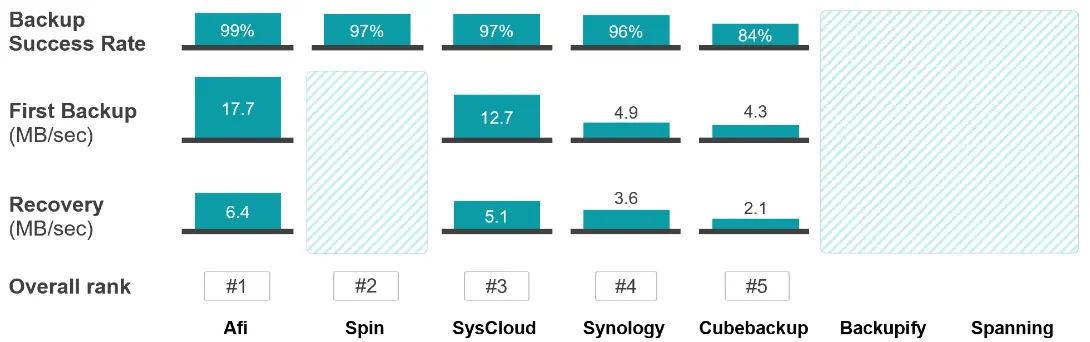
  1. Backup success rate (% ratio). It takes into account all Google Drive and Google Workspace Gmail backup runs during the 2 test weeks. It's calculated as the number of successful backup runs divided by the total backup runs.
  2. Initial backup speed (MB/sec). The average speed of the initial (first) backup. During the first backup all protected data has to be pulled from Google Workspace, which takes much longer compared to subsequent "incremental" backups when only the new (or changed) items are synced.
  3. Restore speed (MB/sec). Measured as the average restore speed for one user backup with 4 GB of data in Gmail and 15 GB in Google Drive.
  4. Feature set (qualitative description). Bullet points highlighting strengths and weaknesses reflecting the accuracy of restore, backup reliability and management features.
 5 

Benchmarking Results (Selected Vendors)

Below are the test results for selected Google Workspace backup options. We only include in this analysis solutions that:

  • have high user ratings and growing usage, based on the Google Workspace Marketplace analysis in section 3;
  • large vendors with substantial market presence (also based on section 3).

In addition to the cloud-based solutions we also include Cubebackup and Synology in this analysis. These providers don't have Google Workspace Marketplace applications (thus missing from the analysis in section 3), because they use a less secure token-based API authentication option (unlike most cloud vendors that leverage modern authentication). Despite this less secure authentication option, we feel the two solutions are good options for customers with small or medium environments who are willing to spend some manual efforts on maintaining the on-premise/DIY cloud software.

Afi, SysCloud and Synology demonstrated the top performance

Top Solutions: Afi, SysCloud, Synology

We believe that Afi, SysCloud and Synology are the best Google Workspace backup options, combining mature feature set with stable performance and reliability. Afi and SysCloud are fully-managed cloud options with built-in multi-tenancy, reporting API and SSO integrations.

Synology, on the other hand, is a local device-based backup solution; it offers a mature product but its on-premises deployment model limits Synology cloud integration and security capabilities.

SpinBackup (Spin.AI)

We don't have full test results for SpinBackup (Spin.AI), but based on the feedback from our service provider partners their performance places them on the 2nd place. While we don't encounter SpinBackup in competitive deals very often, they have some good customer feedback and we may add them to the full comparison later.

In short, SpinBackup backs up all the main Google Workspace data sources, has a reporting and management API, OpenID connect and other integrations, detailed audit log, multi-geo storage (a domain's backups can be stored in multiple data centers) admin roles and self-service recovery. The solution doesn't have Bring Your Own Key (BYOK) capability, has no online email preview and no full-text search.

No Results for Backupify, Spanning

Backupify and Spanning are the oldest and largest Google Workspace backup providers. Together they account for around 15 million of backed up users, or over 40% of the total Google Workspace backup market.

The two solutions offer mature feature sets, including audit log, roles & access management, reporting and API capabilities. Historically they were the most mature and scalable Google Workspace backup options. However, over the last years they went through a series of mergers and acquisitions (both products are now owned by the same company), which affected their product development and stability.

We believe that the low Google Workspace Marketplace ratings, reviews on Reddit and other IT platforms reflect their problems. We no longer think that we can reliably assess their performance and their figures are excluded from the analysis (the original version of this blog post included them).

Other Solutions

Excluded from the benchmarking are solutions with little usage and few user ratings, including Druva, Avepoint and DropSuite and others. These providers have good Microsoft 365 backup solutions and we often compete against them for M365 backup customers. However, their presence in the Google Workspace segment is limited (and they spend fewer resources on supporting Google Workspace).

Another group of vendors missing from this blog post entirely (not just the benchmarking part) are on-premises backup tools that cater to personal and micro-businesses (<10 employees). These tools are cheap, but are missing key backup management, security and restore features. Examples of such tools include Shoviv Backup, Systools and Sysinfo.

 6 

SysCloud

SysCloud is an independent Google Workspace backup & DLP developer focused on the education with a mature feature set.

Pros

  • PST Gmail export (which most vendors don't have)
  • A lot more complete reporting vs other tools, including key events, number of items backed up, backup storage size
  • Recovery progress bar (useful for large recoveries lasting 10+ hours)

Cons

  • No BYOK encryption capabilities, no Okta SAML integration
  • Google Workspace user renaming is unsupported; renamed users are treated as new users, requiring new licenses and full backup.
  • Gmail restore operations overwrite the original data (no option to restore to a separate Gmail label)

SysCloud is the 3rd largest backup solution on the market, and its backup success rate is above average. 4,081 of 4,207 backup runs were successful resulting in healthy 97% backup success rate.

The vendor is focused on Education sector and in addition to the backup features it provides DLP and monitoring features. It competes with specialized software monitoring solutions such as Gaggle and Bark, offering content analysis, review and rapid response services for Google Workspace Education.

SysCloud has a mature backup feature set comparable to Spanning & Backupify. It features backup admin roles and permissions, automated 3x per day backups as well as a detailed audit log.

SysCloud backs up shared drive data that a user has access to (sharing permissions, however, cannot be recovered). It also provides basic backup storage management features, allowing admins to disable or enable backup of large files (audio, video, images) for all or some users. This feature, along with storage reporting, helps backup users control their backup storage (SysCloud offers "unlimited" backup pricing, but your storage footprint impacts your renewal price, as with most unlimited cloud backup options).

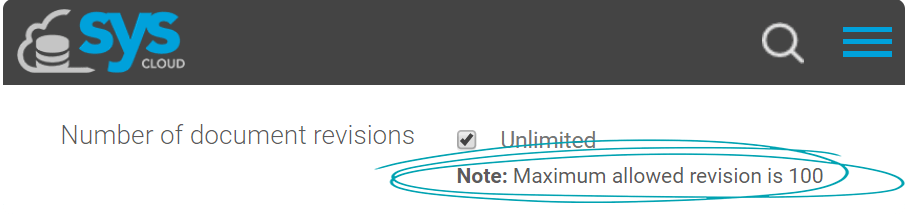
Its most significant limitation is the limited number of backup versions (100). This limitation can inhibit customers' ability to recover from cloud ransomware attacks targeting Google Workspace (certain kinds of malware may rewrite data multiple times in order to put the last undamaged version of data beyond restore).

The number of retained versions is limited in Syscloud backups.
Backup version history limit in SysCloud

Other important limitations include no Bring-Your-Own-Key (BYOK) support and no SAML/Okta integration (having a secondary SSO sign in provider is useful if you lose access to your Google Workspace domain and need to log in to your backup application).

 7 

Synology

Great backup option, with advantages (cost, data control) and limitations (security, scalability) inherent in the appliance model

Pros

  • ~60% licensing cost savings vs cloud options (assuming IT admin time is cheap)
  • High-frequency continuous backups - 5x or more backup runs per day
  • Synology can restore Drive file sharing permissions
  • Synology self-Service portal enables non-admin Google Workspace to export and recover their backup data

Cons

  • Scalability issues for large deployments (the most advanced device, RS3621xs+, supports up to 800 users)
  • Advanced security features are not available (BYOK, Granular Access Groups, SIEM integrations, IP blacklisting, etc)
authentication types It requires service accounts (=admin user credentials) in order to access Google Workspace data. cons: -requires a service account ( cumbersome set up, less secure than native app level integration) - lacks security features No auto-protection by OU. details limitations of - limited self service capabilities ( local only) no byok, no external KMS, key in the same system, no tenant encryption (same key) scaling guide 800 (4 x nas model) sharing permissions recovery limitations; limitations of high-frequency (continuous backups) - link to reddit with synology and afi table with estimated costs synology vs afi/syscloud +- Snapshot replication allows backup data replication to another Synology device afi advantages - no compliance retention afi advantages - email subj, file name search - MBOX/PST export multi-geo advanced roles (screenshot) SSO (okta) - important not to be locked out

Synology Active Backup for Google Workspace software is preinstalled on Synology storage appliances and is for free once you purchase a Synology NAS.

Your local Synology device will use an admin service account to access your Google Workspace domain and perform automated backups, and you'll need to maintain your local setup - making sure backups don't overload your network, keeping track of the available backup storage space, replicating backups to a secondary redundant storage.

Maintenance and IT Admin time

Based on our experience, the amount of IT admin effort required to manage a Synology-based backup is less than the time required to maintain Cubebackup or other on-premises software, which generally requires more time to update, patch, manage hosting and network configs.

At the same time, Synology solution requires more attention than most cloud-based Google Workspace backups that provide automatic handling of Google API errors, air-gapped cloud storage (e.g. Afi backup storage is immutable and redundant).

Strengths and Weaknesses

We believe that Synology invests a great deal in their Google Workspace backup product, offering a mature feature set and stable performance.

Synology backs up shared files and sharing permissions (many cloud-based solutions don't) and generally offers a fairly advanced feature set, including

  • NAS-hosted user self-service portal with Google LDAP-based access
  • Granular data retention settings based on the number of versions & date
  • Email data web-based preview and instant export, much faster than the limited preview and export options provided by other solutions

Synology's best selling points come from its local appliance-based deployment model. It helps organizations avoid regular licensing fees (no maintenance fees after you purchased your NAS) and have greater control over their data that is stored locally in any geography the organization chooses to place their NAS device.

The device-based model has important limitations that cannot be overcome. Specifically, Synology stores backup encryption keys on the same NAS device that stores backups, and doesn't support external Key Management Services (KMS's) because that'd make the system unreliable (minor network problems could lead to unavailable backups).

Other notable features that aren't available in a device-based solution include global IP black listing, tenant-based encryption (all backed up domains are encrypted by the same key if one device is used to back up multiple organizations), external SSO and 2FA solutions.

 8 

Final Thoughts

Many backup vendors don't have the narrow product development focus and commitment that are necessary to provide a reliable and complete Google Workspace backup - primarily because the market segment is relatively small and unimportant for most backup vendors. In this blog post we reviewed the few vendors that invest in their Google Workspace backup solutions, and which we consider our main competitors.

If you want to find the best Google Workspace backup solution for you, don't just rely on online reviews or a vendor demo. Select 2-3 solutions and try them out, you don't need multiple domains to do so - they can be installed on the same Google Workspace domain simultaneously and they'll work in parallel.


All product names are trademarks or registered trademarks of their respective holders; use of them does not imply any affiliation with or endorsement by them.


Afi: Next-Gen Google Workspace Backup

Download datasheet Start free trial now


Related stories

G Suite email backup options overview.

How to recover deleted G Suite Drive files, Gmail data and Contacts?

Ready to try Afi? It only takes 1 min.

Start free trial
© Afi
Security & Legal
Terms
Privacy